Send the right note on the right day.
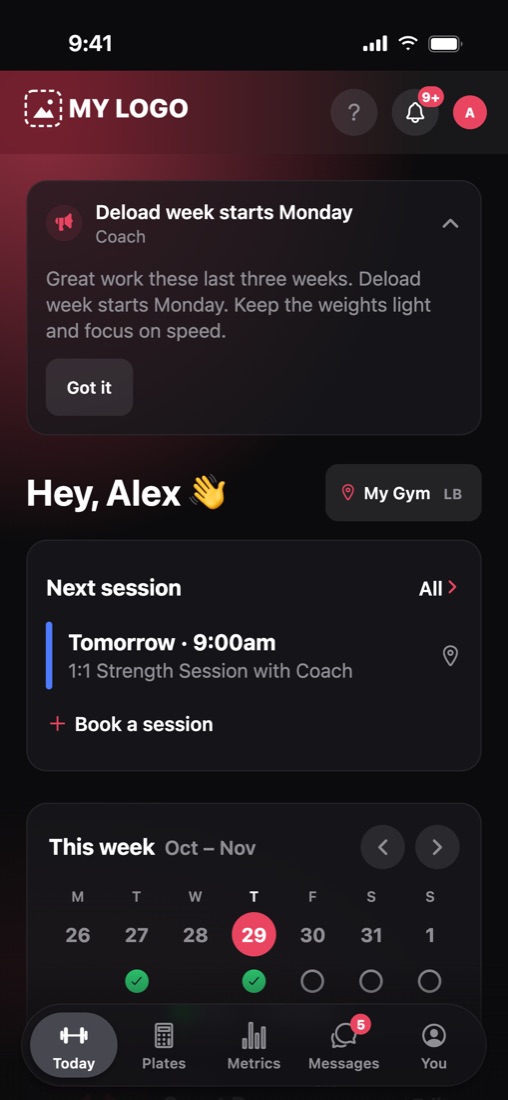
Schedule notes to arrive on a certain day, like a welcome, a heads-up before a heavy week, or what's coming next. They show at the top of the client's Today screen.
Announcements
How it works.
Write it ahead
Choose the day it should arrive.
It shows on Today
It starts as one line, so it doesn't get in the way of training.
They tap Got it
The next note appears, and the old one doesn't come back.
Announcements
What else it does.
- Only the newest note shows, with a count of any waiting.
- Use them for a welcome, or a heads-up before a deload week.
- Clients don't have to scroll through a message thread to find them.
Coach and connect
Related features.
Needs youSee everything waiting on you in one list, with a quick fix for each.Early warningsLoad It flags HRV drops, rising fatigue and big jumps in training load.MessagesSend text, photos, video and voice notes, and comment on a single set.Check-in formsSend your questions on a schedule, with the week's numbers already filled in.Weekly reviewGo through last week one client at a time, with a reply box for each.Groups and challengesRun group chats, a wins feed and leaderboards that a beginner can win.Habits, macros and countdownsSet daily habits, macro targets for training and rest days, and goal countdowns.Nutrition coachingSee clients' meals one by one, get meal photos, and send a weekly nutrition check-in.TasksAsk for weigh-ins, progress photos, a filmed set or a form, on a schedule.Time awayIf a client is sick or on vacation, missed workouts don't count against them.Resource collectionsShare guides, slides, videos and links in sections, all at once or one a week.Workout ratingsClients rate every workout easy, moderate, hard or too hard, and can add a note.DocumentsShare intake forms, health records and letters with each client.
Try it with a program you've already written.
Paste in a real one and see how fast it's ready to send.
Free during beta · No credit card