Review a lift, draw on it and send it back.
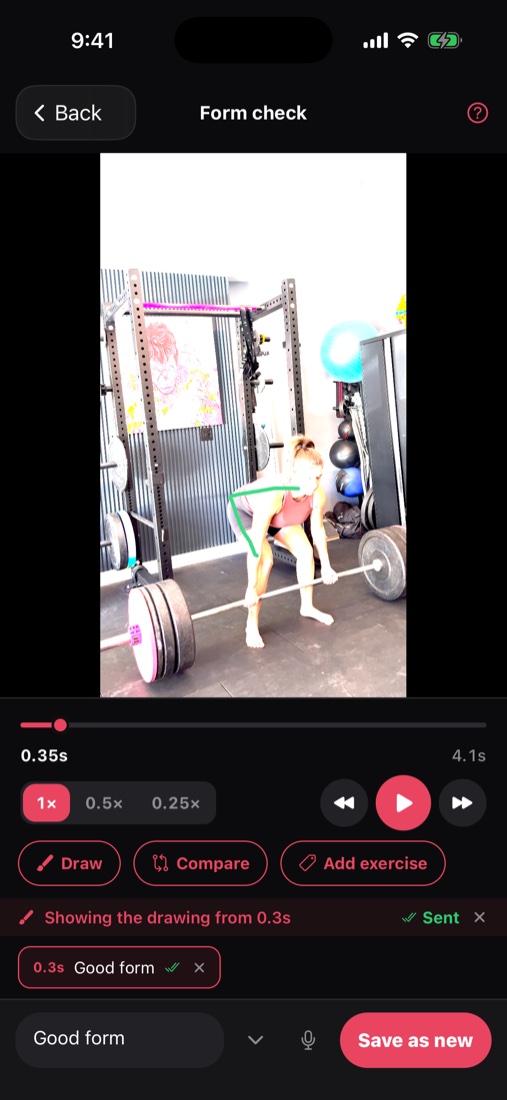
Clients film a set with the built-in camera, and it comes straight to you. You can slow it down, find the right frame, draw on it and send your notes back. You can also put two attempts side by side to show how far they've come.
Form checks
How it works.
They film it
The camera is set up for lifting, with a 0.5× zoom for tight spaces.
You review it
Play it in slow motion or frame by frame, and add lines and notes on top.
They see your notes
Your drawing and notes stay for good, even after the video is deleted.
Form checks
What else it does.
- Videos are kept small enough to send over gym Wi-Fi.
- Each filmed set is saved with that lift's history.
- You can ask for a filmed set as a task.
- You can play two attempts side by side, in sync.
- You can record a voice note on the paused frame.
- Your last note on a lift shows on their workout preview, right before they lift it.
Clients train
Related features.
Plate math, doneOnly in Load ItLoad It shows exactly which plates go on or come off between sets.Apple WatchClients log every set from their wrist, with the bar drawn and rest counting down.Exercise swapsIf the rack is taken, clients can swap the exercise without changing your program.Records and progressSee estimated maxes, records, strength scores and training load, written in plain words.Milestones and Steel MovedEvery workout ends with a summary worth sharing, and trophies for real strength firsts.Works with no signalClients can keep logging in a basement gym, and their sets upload later.Apple Health and Health ConnectClients can share their bodyweight, HRV, resting heart rate, sleep and steps with you.Plates in their colorsClients can paint each plate, or pick a theme for their whole gym.Today, their wayClients can arrange their Today screen, choose light or dark mode, and turn on seasonal looks.Android and the webClients on Android can train in their browser today, and the Android app is on the way.
Try it with a program you've already written.
Paste in a real one and see how fast it's ready to send.
Free during beta · No credit card