Bring in the programs you've already written.
You don't have to rebuild your programs one exercise at a time. Paste a program from your spreadsheet, or upload a PDF, Excel, Word or CSV file. You can even take a photo of a printed plan.
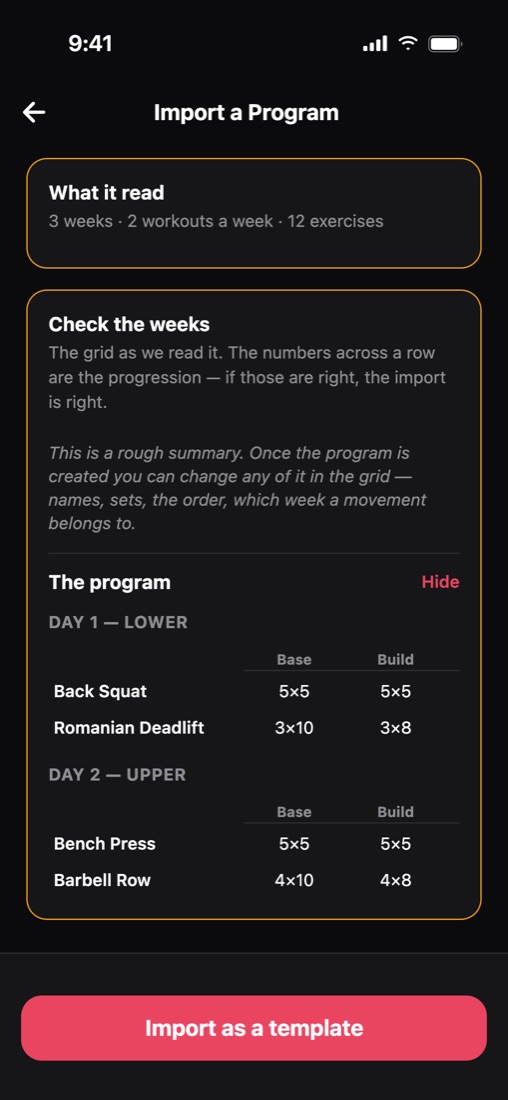
Import any program
How it works.
Paste or upload
You can upload up to 20 files at once, or up to 6 photos of a printed plan.
Check it over
Load It lists every exercise and week it found. Anything it wasn't sure about is shown for you to check.
Save it
It becomes a normal program in your library, ready to edit or assign.
Import any program
What else it does.
- It reads Google Sheets, Excel, CSV, Word, PDF files and photos.
- It reads the PDF exports that other coaching apps make.
- Sets, reps and weights are copied straight from your file. Load It never guesses them.
- It learns your shorthand. Match "DB Bench" to an exercise once, and it remembers next time.
Write programs
Related features.
Program builderLay out weeks across the top and exercises down the side, then copy week 1 across the block.Auto progressionSet how much to add once, and each client's weight goes up when they hit their reps.Can they load it?Only in Load ItLoad It checks every weight in a program against each client's own bar and plates.Exercise libraryChoose from 349 exercises with coaching cues, or add your own exercises and videos.Timed workoutsRun EMOMs, AMRAPs, circuits and rounds for time, with the timer built in.Printable workoutsPrint a workout with the client's own weights and the plates for each side.On the web and iPadCoach from a computer or an iPad, where you can see more at once.
Try it with a program you've already written.
Paste in a real one and see how fast it's ready to send.
Free during beta · No credit card